apk.cafe
Best apps for your Android

Hi, There you can download APK file "Scanner Keyboard" for Android free, apk file version is 3.10.0 to download to your android device just click this button. It's easy and warranty. We provide only original apk files. If any of materials on this site violates your rights, report us

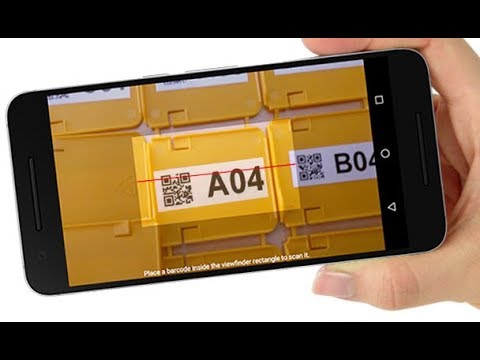
Screenshots of Scanner Keyboard
  • Scanner Keyboard
  • Scanner Keyboard
  • Scanner Keyboard
  • Scanner Keyboard
  • Scanner Keyboard
  • Scanner Keyboard
  • Scanner Keyboard
  • Scanner Keyboard
  • Scanner Keyboard
  • Scanner Keyboard
  • Scanner Keyboard
  • Scanner Keyboard
  • Scanner Keyboard
  • Scanner Keyboard
  • Scanner Keyboard
  • Scanner Keyboard
  • Scanner Keyboard
  • Scanner Keyboard
  • Scanner Keyboard
  • Scanner Keyboard
  • Scanner Keyboard
  • Scanner Keyboard
Description of Scanner Keyboard (from google play)

Use this innovative soft-keyboard to scan barcodes, QR codes, text (OCR) and NFC tags into any app. Invoke the integrated scanners with a single tap, the scanned data appears immediately in the target app like manually typed on the keyboard. This works perfectly with almost any target app without modifications.

TIME SAVING
This keyboard is a convenient time saver! It reduces typing efforts and avoids typing errors. Tedious copy/paste is not required anymore; barcodes and QR codes, texts and NFC tags are scanned without app switching. The keyboard layout resembles the layout of the Android standard keyboard - you will immediately be familiar with it.

VERSATILE
This Scanner Keyboard is very flexible, ready for volume licensing, optimized for bulk deployment and can be configured to meet virtually all requirements. It meets demands of commercial, industrial, logistics and supply chain applications.

BARCODE SCANNING
Choose between two integrated camera barcode scanners. The traditional barcode scanner is ideal for older phone models, the recently introduced advanced barcode scanner provides selective barcode scanning - a very valuable feature if multiple barcodes are visible in the scan view.

TEXT RECOGNITION (OCR)
The integrated text scanner (OCR), converts camera images to text within seconds. Latin-based text in pictures of arbitrary documents is detected automatically and inserted into the target app.

FEATURES
◾ Keyboard with modern layout, voice recognition, spelling suggestions and multi-language support
◾ Two camera barcode scanner engines to choose from
◾ Selective barcode scanning (tap on barcode of interest)
◾ OCR text scanner converts images to Latin-based text
◾ Integrated NFC tag reader
◾ Quick front/back camera switching and flashlight support
◾ Autofocus support
◾ Works with almost any target app
◾ Swipe to change keyboard layout
◾ Configurable auto-scan (invoke scanner automatically)
◾ Configurable scanner keys
◾ One-by-one / batch mode scanning
◾ Macro support / Quicktext
◾ Multiple licensing options
◾ Ready for bulk deployment
◾ And much more...

COMPATIBILITY / LIMITATIONS
Scanner Keyboard is available for Android 4.0 (Ice Cream Sandwich) and higher. The advanced barcode scanner and the OCR text scanner are supported from Android 5.0 (Lollipop) onward and requires installed Google Play services. The keyboard supports common input languages and keyboard layouts, the keyboard layout automatically matches the system settings of your Android device.

BULK/ENTERPRISE LICENSING, OEM VERSIONS
For users with volume license requirements, TEC-IT offers a bulk-license version of the app (no Google account required). Customized or OEM versions (e.g. with seamless integration of hardware scanners) are available on request. Please contact [email protected].

FREE DEMO
The free trial displays a demo hint in irregular intervals. Please upgrade (in-app purchase) to the unlimited version to remove this limitation.

SUPPORT
In case of problems, questions or requests please contact [email protected], TECITSupport (Skype) or visit https://www.tec-it.com/bsk.

Terms of use and privacy: https://www.tec-it.com/download/PDF/TEC-IT_AGB_EN.pdf

What's new in Scanner Keyboard
New in Scanner Keyboard 3.10.0
• Fixed some issues related to keyboard layouts
• The OCR Scanner is now also working with higher camera resolutions
Please rate this app

Scanner Keyboard Version History: APK Size & Android Support

Explore the version history of Scanner Keyboard for Android and see how the app has evolved over time. This section tracks versions added to the apk.cafe catalog, including download size, declared permissions, and Android compatibility. Select a time period or a point on a chart to explore historical version data.

Scanner Keyboard Catalog Statistics

Scanner Keyboard Versions Added by Year

20251 version added
New versions in the catalogNo updates since Feb 2025

1 new Scanner Keyboard version was added to the apk.cafe catalog in 2025. The catalog contains 26 versions dating back to July 2017.

Scanner Keyboard Download Size History

3.10.0Feb 17, 202528.79 MB APKS: 21.51 MB base + 7.28 MB split parts
APKAPKS (split APK)No updates since Feb 2025

The Scanner Keyboard download size for most phones increased from 22.47 MB in version 2.6.1 (2017) to 28.79 MB in version 3.10.0, a 28% increase. 2 of 26 versions in the catalog are APKS (split APK), starting with version 3.5.0 (February 2021).

Scanner Keyboard Permissions History

3.10.0Feb 17, 202515 permissions
Permissions declared by the versionNo updates since Feb 2025

Scanner Keyboard has declared 15 permissions since 2017 (version 2.6.1).

Scanner Keyboard Android Compatibility History

3.10.0Feb 17, 2025Android 5.0+, built for 14
Requires (minimum Android)Built for (target Android)No updates since Feb 2025

Scanner Keyboard 3.10.0 requires Android 5.0 or newer and is built for Android 14; version 2.6.1 from 2017 ran on Android 4.0 or newer.

Older versions of Scanner Keyboard. The apk.cafe catalog has 26 versions of Scanner Keyboard, from 2.6.1 (Jul 2017) to Scanner Keyboard 3.10.0 (Feb 17, 2025). If the latest version has a bug, changed something you rely on or does not work on your phone, you can install an earlier one from the list of older Scanner Keyboard APK versions below.

Version 3.10.0 needs Android 5.0 or newer. On older phones: Android 4.4 runs up to version 2.8.1 (May 2019), Android 4.0 runs up to version 2.6.7 (Dec 2017).

Android does not install an older version over a newer one, so uninstall Scanner Keyboard first. This usually deletes the app's data on the phone, so back up anything you need.

Dates show when each version was added to the apk.cafe catalog. Size is the full download for most phones (APK and split parts); permissions are for the same build.

More info
Advertisement
Scanner Keyboard Older APK Versions for Android
Similar apps
Popular android apps